Practical guide · October 12, 2026
How to animate a photo,
one small movement at a time.
Start with one clear image. Ask for one main movement. Generate a short clip, then inspect it against the original. Here’s the workflow, with two prompts that have actual outputs and one clearly marked suggestion.
Open the image-to-video tool →From a still image to an MP4
1. Prepare the photo before uploading
Choose an image you own or have permission to use. Keep the subject in focus, leave space around its edges, and check for blurry faces or tiny lettering. VideoForge accepts one PNG, JPEG or WebP up to 10 MB. Crop or pad in an image editor first; the default P-Video model follows the source image shape.
For a vertical product shot, prepare a 9:16 source and use the product-photo workflow. For artwork, use a clean export or a well-lit, straight-on photograph.
2. Describe what should move
Use this starting structure: camera movement + one subject or background action + pace + what should remain steady. For example, ask for gently moving leaves with a still camera. Avoid combining a rotation, zoom, pose change and scene transition in the first attempt.
Runway’s Gen-4.5 guidance recommends motion-focused language, a clear source image and a simple starting prompt. That is model-specific guidance, not a guarantee across VideoForge’s models. Read Runway’s image-to-video prompting guide.
3. Review settings and credit cost
The image tool starts with P-Video, five seconds, 720p and audio off: currently 1 customer credit per generation. Other models and settings change the quote. Prompts must be 10–500 characters. Sign in and purchase a credit pack if needed, then review the restored draft before choosing Create Video. Returning from checkout never generates automatically.
4. Watch, compare and download
Watch from beginning to end. Compare faces, hands, lettering, color and the outer silhouette with the input. Save the MP4 if the result works. Each new generation uses credits separately, so change one instruction at a time and review the next quote. Add music, captions, cuts or a call to action in your video editor.
Prompts you can reuse and adapt
The first two are the exact prompts behind the examples below, each generated once. Their outcomes do not establish reliability for other images. The preservation requests in a prompt are instructions, not locks. Use the suggested variation as a starting point, not a tested recipe.
Tested once · existing output below
Product / gentle slide
Used once on our mock bottle photo. The bottle stays in frame; inspect fine lettering.
A subtle, smooth sideways camera slide. Keep the original view of the product. Use the supplied photograph as the first frame. Preserve the product shape, color, proportions, label and packaging. Keep lighting consistent. No rotation, no new objects, no added text, no hands, no cuts. One continuous five-second shot.
The tool link replaces your motion instructions; your retained image and model settings stay available. Match the example’s P-Video settings to compare.
Tested once · existing output below
Illustration / moving leaves
Used once on our original night garden. Gentle leaf movement, with slight shape and position drift.
Locked camera. A light breeze gently sways the tall leaves. Keep the cat and moon still. Retain the flat colors, paper-like background and illustrated linework. No new objects or cuts. One continuous five-second shot.
The tool link replaces your motion instructions; your retained image and model settings stay available. Match the example’s P-Video settings to compare.
Suggested variation · untested
Photo / slow push-in
Suggested starting point; no output tested for this variation. Replace “main subject” with what is in your photo.
A very slow camera push in toward the main subject. Keep the subject in its original pose and the lighting consistent. Retain the original composition and colors. No new objects, added text or cuts. One continuous five-second shot.
The tool link replaces your motion instructions; your retained image and model settings stay available. Match the example’s P-Video settings to compare.
What the actual outputs show
Both examples used P-Video, five seconds, 720p selected, audio off and the model’s default prompt upsampling. Delivered dimensions differ from the quality label. Download the original input and output to examine them yourself.
A gentle slide around a mock product
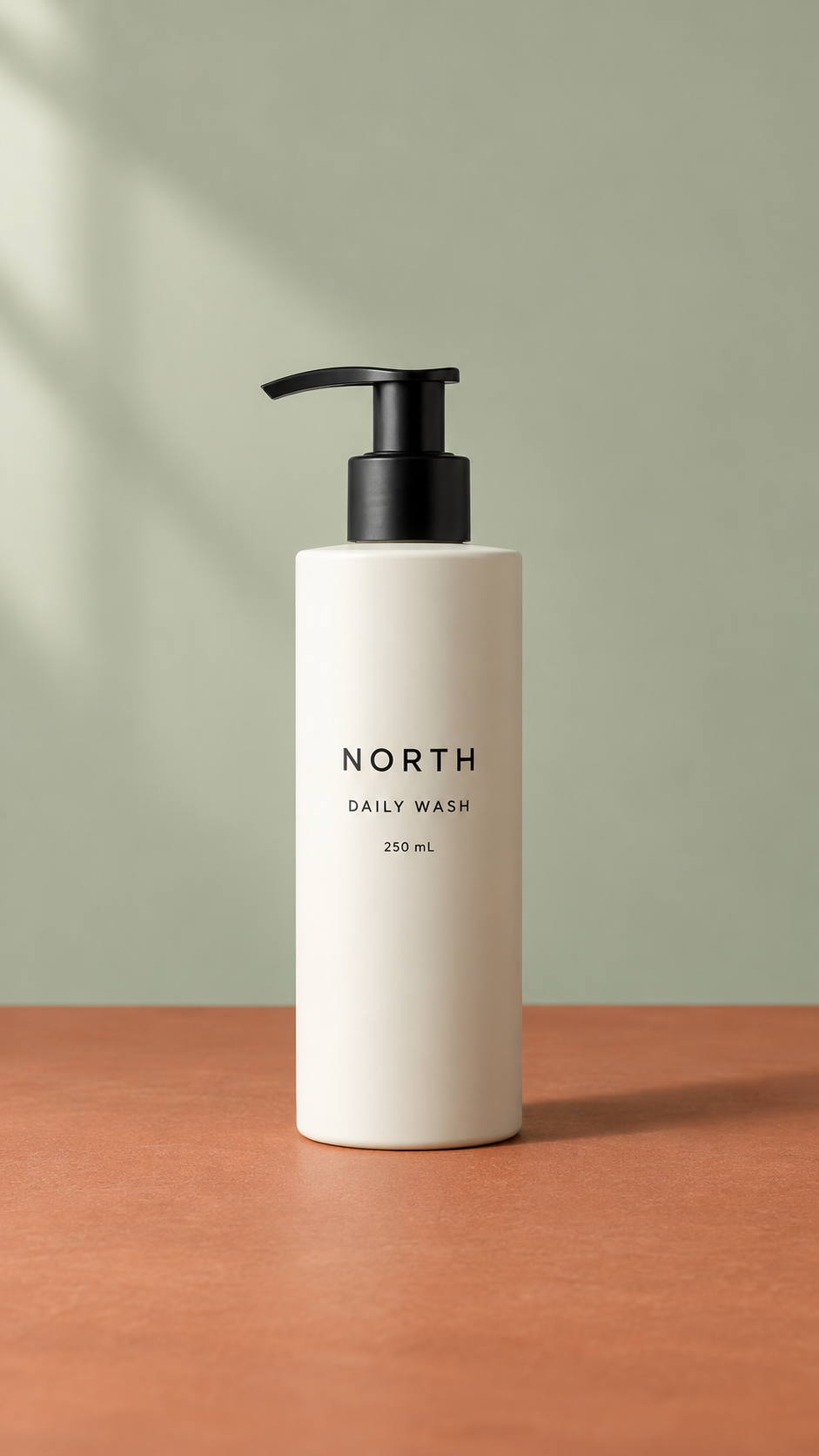
October 11, 2026 · P-Video · 5 seconds · 720p requested, 704 × 1280 delivered · no audio
One actual take on our synthetic practice photo. The bottle stays in frame during the sideways move; fine label text still needs inspection. This is not a customer product or a fidelity benchmark.
See the full example and workflowA light breeze through an original illustration

October 12, 2026 · P-Video · 5 seconds · 720p requested, 1088 × 832 delivered · no audio
One actual take on our own artwork. The leaves sway gently; the palette carries through with slight changes in shapes and positions. The cat and moon remain recognizable, but their pixels are not locked.
See the full example and workflowOn the same mock bottle, our push-in cropped the pump near the end; the steady hero take changed lighting and shadow substantially. That is why “keep the product still” is not enough to guarantee a usable shot. Compare all three product takes before choosing a motion.
When the result needs work
| What you see | What to try next |
|---|---|
| The subject gets cropped | Leave more room in the source or reduce the camera move. Our push-in example shows this exact risk. |
| Lettering or faces drift | Try less motion and a clearer input. Reject any take that changes essential identity or product details; prompting cannot guarantee a fix. |
| Too much happens | Keep one action and remove competing directions. Name the specific object that should move. |
| Little visible movement | Name an existing movable element and its motion. Change that instruction first, then reassess the separately priced result. |
| Wrong shape for your post | Prepare the source crop before generation. For P-Video image inputs, the aspect-ratio selector does not reshape your photo. |
VideoForge creates short clips from a single image or text. It does not provide stitching, masks, an end-frame input or a precise camera path. A repeated playback is not proof of a seamless loop.